

A travel payment card can be convenient in London, especially if you prefer to pay by card rather than carry much cash. Compare the exchange rate and any plan, weekend, ATM or card fees before you choose one. Gone are the days of exchanging a large amount of cash before travelling abroad and taking this cash with you everywhere you go.
Our favourite payment travel card is Revolut. It is one of the best options as Revolut allows you to spend abroad like a local. If you travel to London but don’t want to carry a load of cash, we recommend using Revolut.
This article will explain how to open a Revolut account and how Revolut works. We first started using Revolut to travel to Europe, but now we use Revolut as our everyday card in London.
If you use our Revolut link, check the current terms, eligibility and any offer on Revolut’s website before opening an account. The link is an affiliate link.
What is Revolut?
Revolut is simply a multi-currency travel card but with lots of benefits. This travel card is a regular debit card designed to hold multiple currencies in your account. The cost of converting and spending money depends on your provider, country and plan. Revolut’s Standard plan has an exchange allowance and may charge weekend exchange fees; check the terms for your country in the app.
Revolut is an alternative and secure payment method that has changed how we make our payments abroad. We find it useful for everyday card payments abroad, but we check the exchange rate and applicable fees before changing currency or paying in another currency.
How does the Revolut Travel Card work?
Using Revolut is very easy. It’s like using your regular Visa or Mastercard debit cards. The main difference is that everything is based on a mobile app or your own Revolut Card if you order one.
Once you create a Revolut account, you will receive a virtual debit card. Add this virtual card to your Apple Pay or Google Wallet App to make contactless payments with your phone or smartwatch. You can also request a physical card which will be sent to your home address. This card can then be used as any other debit card.
Can you use a Revolut Travel card in London?
Yes. You can use your Revolut Card in London to make payments at restaurants, shops, market stalls…
Sometimes, when paying with your Revolut Card in London in shops, restaurants or other establishments, the card reader will ask if you want to pay in British pounds or your home currency. In this case, we would always recommend you choose to pay in British pounds.
Where to use the Revolut Card in London
To pay for public transport in London
One of the main advantages of having a Revolut card for your trip to London is that you can use it to pay for the London Underground and London buses, as well as other methods of public transport in London. Being contactless, it works exactly the same as an Oyster Card, and the best thing is that when you use it, the cheapest fare for that route is automatically applied.
You can use your Revolut card to pay for London’s public transport as a contactless card if you have a physical card. You can pay also pay using Apple Pay or Google Wallet with your mobile phone (make sure your NFC is activated) or your smartwatch. Tap with your phone on the yellow reader when entering the London underground or on the bus, just as you would with an Oyster Card.
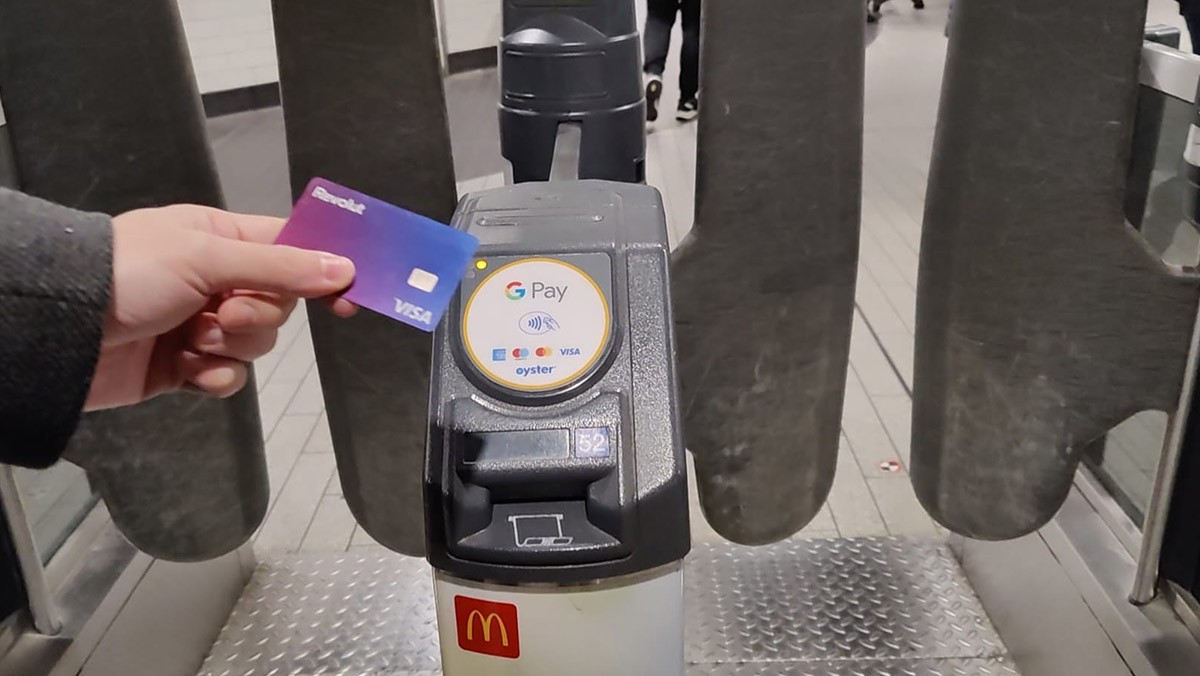
A few things to have in mind when using a Revolut card to pay for public transport
- One per person: One card is needed per person to pay the correct fare on the London Underground, DLR and London Transport Network trains, just like an Oyster Card. You will need to tap the yellow reader with your card (or phone) when entering the London Underground and then again to exit. The fare you pay depends on the number of London Transport Zones you have gone through. Use the same physical card or the same device to tap in and out of each rail journey; mixing a phone and card can cause incomplete journeys and maximum fares. Each traveller needs their own contactless card or device.
- Using Revolut on London buses: To use a contactless card on London buses, it is only necessary to tap your card onto the yellow reader when entering the bus. You don’t have to tap again when you leave the bus.
⇒ Find out more: Contactless payments on London’s Transport
To pay in shops and restaurants
You can use the Revolut card to pay in shops and restaurants in London, including most market stalls. You will see that in London, we hardly use cash anymore, and everyone pays with a contactless card, even for very small amounts (1 pound!) in different establishments.
To pay at the hotel, on the plane and at the airport
You can also use it to pay for anything you may need at the hotel in London, in shops and restaurants in central London, at the airport and even on the plane.
To withdraw cash at ATMs
You can withdraw cash (pounds) at ATMs in London with your Revolut Card. You will need a physical card for this since not many ATMs in London accept contactless cash withdrawals yet. Check the ATM screen for any operator charge before you confirm the withdrawal. An ATM with no operator charge can still trigger a Revolut fee if you exceed your plan’s monthly allowance.
ATM operator charges and Revolut’s own withdrawal fees are separate. Review both before withdrawing, and decline any offer to convert the amount into your home currency at the ATM if you want Revolut to handle the conversion.
Revolut Plans
Revolut offers a free Standard plan and several paid plans. Limits, included services and fees vary by country and can change; check the current plan comparison before signing up.
The Revolut card is quite flexible, and the free account is usually sufficient if you use it to travel to London. Look at the different plans to be aware of any limits you should know about.
ATM cash withdrawal may be limited to a certain monthly amount, depending on your chosen plan. If you withdraw over the established limit in one month, there will be a commission fee. The allowance is linked to the account and plan, so check the limit in the Revolut app before withdrawing.
Card purchases in your base currency generally do not attract a Revolut card-payment fee, but paying in another currency can involve exchange allowances and fees. Check the fees shown in your app.
Weekend exchange charges and fair-usage fees depend on your plan and country. Even weekday exchanges can incur a fee after your allowance is used. Check the current Revolut fee schedule and the amount shown in the app before exchanging.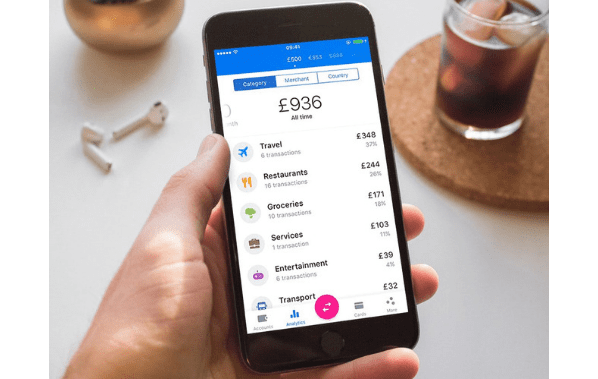
While you don’t need to upgrade your account to a Premium account, if you like travelling a lot (lucky you!), “Revolut Premium” and “Revolut Metal” options may be beneficial. Read the terms and conditions on the Revolut website.
Advantages of using the Revolut Card
After having used our Revolut Card in various countries such as Spain, the UK, Italy and France, all we have seen are advantages. Some of these advantages are:
- You can check the exchange rate and any applicable fee in the app before converting currency.
- You can hold and exchange multiple supported currencies; availability depends on your country and account.
- You can use it to pay in different establishments and withdraw cash from Visa or Mastercard ATMs.
- You can manage your Revolut Card from the mobile application. This allows you to add money easily by transferring from your bank account. One the app you can also check your balance, transfer money or block your card.
Something that we also find very useful about the Revolut Card is that the mobile application interface shows you all your expenses grouped by categories. So you can see what you have spent your money on for your chosen period.
Check current Revolut offers
Offers and eligibility vary. Check the terms shown on Revolut’s website through our affiliate link; we cannot guarantee a joining bonus.
How to Create and Use a Revolut Account
Steps to create a Revolut account
You can start an application in the Revolut app. Identity checks, eligibility and the time needed to open an account vary.
First Step
Click on the following link to go to the official Revolut website:
Second Step
- Check your country is selected. You can change your country at the bottom of the page.
- The first thing they will ask you for is your mobile phone number. Enter your phone number and click send.
- You will receive a text message to verify your phone number, and you will be given a link to download the Revolut mobile app and create your Revolut account.
Third Step
- Once everything has been verified, you can access your card payment details.
- You will also have access to a virtual Revolut card. This card can be used for online transactions, or you can add it to Google Wallet or Apple Pay apps to make contactless payments in shops, restaurants etc.
- They usually check your identity with an official document. The app will take you through a step-by-step process and give you a list of valid documents. They do this to prevent people from creating fake accounts.
- If you do not verify your account with a document, the card will have limitations due to security reasons.
Fourth Step
- Add money to your Revolut account. You can transfer money by BACS from your regular bank account or click the ‘add money’ button to transfer money easily using Google Wallet or Apple Pay.
- The money you have added to your Revolut will appear in your account in a matter of minutes or seconds. This money will appear in your home currency.
- Once you have money in your account, you can also order a physical card if you want one.
Fifth Step
To exchange your money for British Pounds, click ‘Accounts’ at the top left corner of the app and select ‘Add a British Pounds account’.
If you then click on the three dots that appear next to your regular account, it will show you the currency exchange options, and give you the option to exchange your money into Pounds.
Sixth Step
When you arrive in London, you can use your physical Revolut card (if you have one) or pay using contactless payments with your mobile phone in shops, restaurants, the London Underground, and buses…
Get a Revolut Debit Card
Revolut offers both Visa and Mastercard cards. Your country of residence determines which card you will receive. Click “Order Card” on your Revolut app to order a physical card.
How long does it take to get the Revolut Card?
Revolut usually offers two shipping options; the cheapest option takes a bit longer, but there is also an express option if you need your card to be delivered sooner.
Cancelling a card
If you lose your card or need to cancel it for any reason, all you have to do is mark the card as lost in the Revolut app, and you’ll be given the option to order a new one. The previous card will be deactivated and cancelled.
How to add money to your Revolut Account
It’s straightforward to add money to your Revolut account; follow these steps:
- Open your Revolut app.
- Select “Accounts” and click on “Add Money”. It will allow you to transfer money from another card or bank account.
- Everything is processed in a few seconds, and you can use your Revolut card immediately.
Information and Tips to use Revolut in London
- The Revolut mobile app is available for both iOS and Android phones, and it is very intuitive and easy to use.
- Assuming that you already have your account activated and are using your card, in the Revolut app, you can do everything related to top-ups, request new cards, etc. You can also activate or deactivate your card.
- From the app, you can also set a spending limit for a period of time on each Revolut card.
- It’s always a good idea to bring more than one form of payment if you rely on card payments, to be safe.
- Use the Revolut Card to pay for reduced amounts such as transportation and meals. If you pay for your hotel while in London, you will reach the maximum limit for commission-free transactions sooner. For accommodation, we would recommend using an international booking website, so you can pay online with your regular bank card before travelling.
- The Revolut Card is “Contactless”, so you can use it on the London Underground as an Oyster. It comes in handy when you arrive at the airport and want to take the tube or train, and you don’t want to stop to get the Oyster in the machines, etc.
- We recommend carrying a few pounds in cash while visiting London and not relying exclusively on the card.
What to do with your Revolut when you have returned from your trip
When you return home, you can continue using your Revolut card as a regular debit card. Change any remaining pounds to your home currency, and you can use it as usual. Or you can transfer this money back to your regular bank account.
Revolut<18: Revolut for Under 18s
Revolut<18 is one of the best options for student trips to the UK for under 18s. We don’t really use cash in London anymore, as we now pay for practically everything using contactless cards. Sending the kids with large amounts of cash is no longer practical or safe, so giving them a Payment card for their trip is the way forward.
Revolut <18 is a Revolut account for 6 to 18-year-olds. The account is linked to the parent’s Revolut account, giving the parent control over the minor’s account. We can quickly transfer money to our children’s accounts through our Revolut app and see how much and where they use their cards. Please remember that Terms & Conditions apply.
The minor will have their own Revolut <18 app, and once an adult has requested a debit card for them, they will have their own card. This card can be added to Google Wallet or Apple Pay to make contactless payments with their phone.
Revolut <18 for 6 – 12 years old
If your child is between 6 and 12, you must create a Revolut account for yourself first, following the steps explained above. On your Revolut app, you can create a Revolut <18 account for your child. They can then download the Revolut <18 app on their phone.
Revolut <18 for 13 – 17 years old
If your child is between 13 and 17, they can download the Revolut <18 app on their phone and create an account. You will need to approve their Revolut <18 accounts in your app, so you must create a Revolut account for yourself first, following the steps explained above.
Order a Revolut card <18
Once you have approved the Revolut <18 accounts for your children, you can request a contactless debit card for your children on your app. You will have to pay a small fee for this card. They can add this card to Google Wallet or Apple Pay to make contactless payments with their phone.
It’s not possible to order a Revolut <18 card for children under 6 years old.
More information about the Revolut<18 account
- The Revolut<18 account will be created in the same currency as the parent’s account.
- The Revolut<18 account can only be created in the same currency as the parent’s account. Unlike the adult account, it is not possible to create different accounts for different currencies in the Revolut<18 account. Once your child has arrived in the UK, they can use their card as usual (in shops, restaurants, and public transport…). The applicable exchange rate and any fee depend on the account and when currency is exchanged.
- A physical contactless card can be ordered and personalized (for a fee).
- ATM cash withdrawals are free with every Revolut card <18 up to a certain amount per month. Beyond that amount, a commission of 2% is applied.
- A fee will apply for currency exchanges over a certain amount using Revolut <18 for each billing cycle month.

Hi, we are Alberto and Amy, the London locals behind PlanTrip London. We’ve lived in London since 2010 and have spent every year since exploring the city, from its famous landmarks to the markets, pubs, parks and hidden corners most visitors never find. Over the years we became the go-to trip planners for friends and family visiting London, so we created this site to share the same first-hand, tried-and-tested advice with you. Every itinerary, tip and recommendation here comes from our own experience with our two children, so you can plan a London trip that’s easier, better value and far more memorable.